

You’ve sat through a demo where someone casually dropped “RAG pipeline,” nodded along when a vendor mentioned “knowledge base,” and quietly Googled “what is an LLM” under the table. No shame: the AI world moves fast, and the vocabulary moves faster.
This post is your cheat sheet. Fifteen terms, zero jargon rabbit holes. I’ll explain each one the way I’d explain it to a friend over coffee.
Part 1: The Building Blocks
These two concepts come up in nearly every AI conversation. Nail them and the rest clicks into place much faster.
1. LLM - The engine behind modern AI tools
LLM stands for Large Language Model. It’s a type of AI trained on massive amounts of text to understand and generate human language. At its core, it does one thing: predict the next token (the small chunks of text we’ll cover in #2). Give it “all that glitters” and it predicts “is not gold.” That simple idea, scaled up to billions of examples, produces something that feels like understanding.
You probably know the products built on top of LLMs: ChatGPT, Claude, Gemini. These are AI assistants, each backed by model families from their respective providers (OpenAI, Anthropic, Google, Meta, and others). Under the hood, each provider offers multiple models tuned for different tradeoffs between speed, cost, and capability.
A note on cost: More capable models cost more per use. For simple tasks like summarizing emails or answering FAQs, smaller, cheaper models (like Claude Haiku or Gemini Flash) work great and can cost a fraction of a cent per request. Save the heavy hitters for complex work.
When someone says “we’re building on top of an LLM,” they mean they’re using one of these models as the engine behind their product.
2. Token - The unit AI reads in, and charges you for
AI models don’t read full words. They break text into subword chunks called tokens. Each model has its own tokenizer, so the exact split varies, but here’s roughly how it works:
“Artificial intelligence is transforming business” →
[Artific] [ial] [ intelligence] [ is] [ transform] [ing] [ business]
In English, a token averages about three-quarters of a word, though this varies across languages and models. Tokens are an implementation detail, not a linguistic unit, but they matter for two practical reasons: AI providers charge per token, and every model has a maximum number of tokens it can process at once (more on that in a moment).
Part 2: Working with AI
These are the concepts you’ll encounter every time you interact with or deploy an AI system.
3. Prompt Engineering - The art of asking AI the right question
Every time you type something into ChatGPT, that’s a prompt. But a well-crafted prompt includes context, examples, and specific instructions. It’s the difference between telling a new hire “handle this” and giving them a detailed brief with examples of what good looks like.
In practice, prompt engineering usually means building reusable prompt templates with structured instructions, constraints, and output formats, not just clever one-off phrasing. One powerful technique is few-shot prompting, where you give the AI examples before asking your question:
Classify these support tickets:

"My order hasn't arrived" → Shipping
"The app keeps crashing" → Technical

Now classify: "I was charged twice" → ?
By seeing the pattern, the AI gives you much more consistent results.
4. Context Window - How much the AI can see at once
Every AI model has a fixed token budget called the context window. Your input, any background documents, and the model’s own response all share this budget.
Think of it as the size of the AI’s desk: the bigger the desk, the more documents it can spread out and reference at the same time.
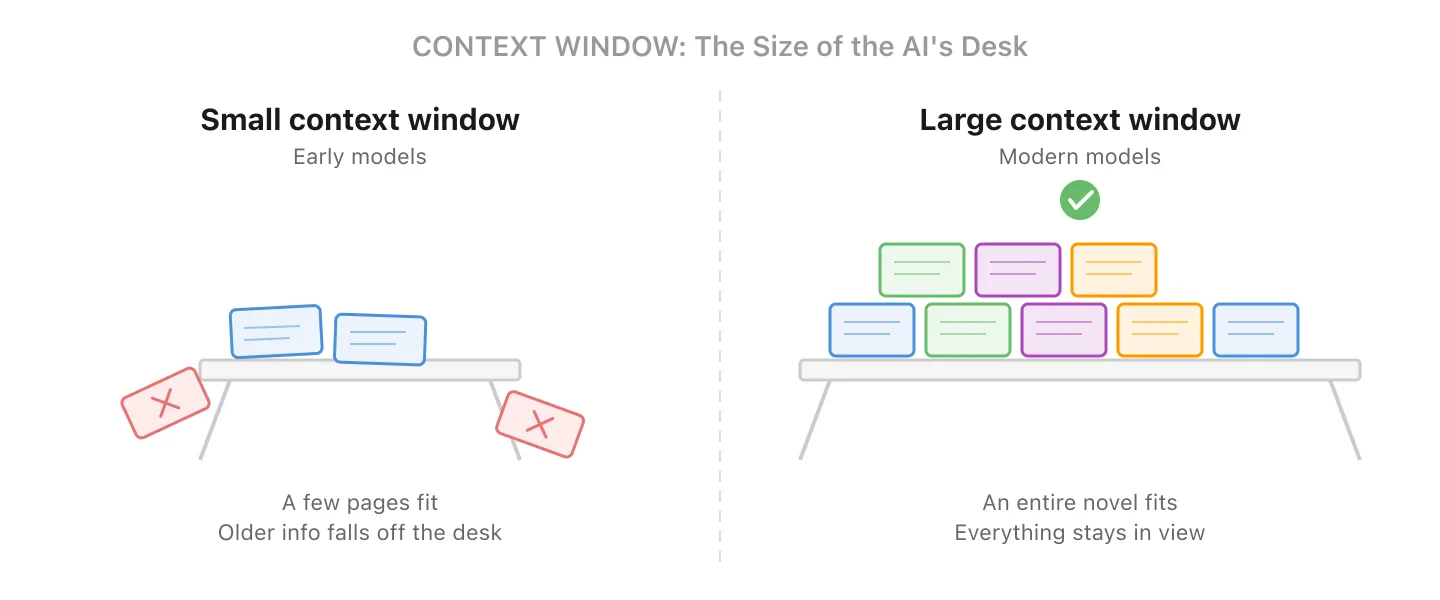
Early models (around 2022-2023) topped out around 4,000-8,000 tokens, roughly a few pages of text. Some modern models handle 128,000 to over 1 million tokens (enough for hundreds of pages), though the largest windows often come with higher-tier plans or API pricing. But there’s always a limit. The model itself only sees what fits in the window; when a conversation grows too long, the application in front of it may summarize, trim, or selectively retrieve older information to stay within budget.
Why this matters for cost: In a chat conversation, every message you send includes the entire conversation history. The AI doesn’t just read your last message; it re-reads everything from the start. So the cost per message grows as the conversation gets longer. A 50-message thread costs significantly more per reply than a fresh one. This is why many applications automatically summarize or truncate older messages behind the scenes.
5. Fine-Tuning - Teaching AI a specific style or behavior
LLMs start as generalists: they know a little about everything. Fine-tuning trains them further on your data so they adopt a specific tone, format, or behavior. It’s less about adding new facts (RAG is better for that, see #10) and more about shaping how the model responds.
For example, you might fine-tune a model so it always uses your brand voice, follows a specific output format, or handles domain-specific terminology consistently. Modern approaches like LoRA (Low-Rank Adaptation) make this faster and cheaper than retraining a full model, but it still requires careful data preparation and evaluation.
In practice: For most business use cases, RAG is a simpler and more cost-effective starting point. Fine-tuning shines when you need consistent behavior that’s hard to achieve through prompting alone.
6. Hallucination - When AI confidently makes things up
LLMs generate text based on patterns, not facts. Sometimes they produce something that sounds perfectly reasonable but is completely wrong: a fake statistic, a non-existent legal case, a citation that doesn’t exist. Think of that one colleague who always has an answer, even when they have no idea. Same energy.
This is arguably the most important term on this list for anyone deploying AI. Hallucinations are an inherent risk of how these models work. They can be significantly reduced through grounding, retrieval (RAG), and verification layers, but not fully eliminated. If you’re putting AI in front of customers, you need safeguards in place. We wrote a deeper dive on this topic: How to Make AI Outputs Reliable.
7. Guardrails - Safety fences for your AI
Guardrails are the rules, filters, and systems that keep your AI from going off the rails. In practice, this includes several layers:
- PII redaction: automatically stripping personal data (names, emails, phone numbers) from inputs and outputs
- Policy filters: blocking responses on off-limits topics or enforcing compliance rules
- Citation requirements: forcing the AI to reference source documents rather than generating from memory
- Tool allow-lists: restricting which actions an AI agent can take (e.g., read-only database access)
- Human-in-the-loop: requiring manual approval before the AI takes high-stakes actions
These range from simple prompt instructions to sophisticated multi-layer systems. If you’re putting AI in front of customers, guardrails aren’t optional.
Part 3: Connecting AI to Your Data
This is where things get exciting. These are the patterns that turn a generic AI into something that actually knows your business.
8. Knowledge Base - Your company’s curated source of truth
A knowledge base is the organized collection of documents, FAQs, policies, and data that you maintain as your AI’s reference material. Think of it as the employee handbook, product docs, and tribal knowledge all rolled into one curated library.
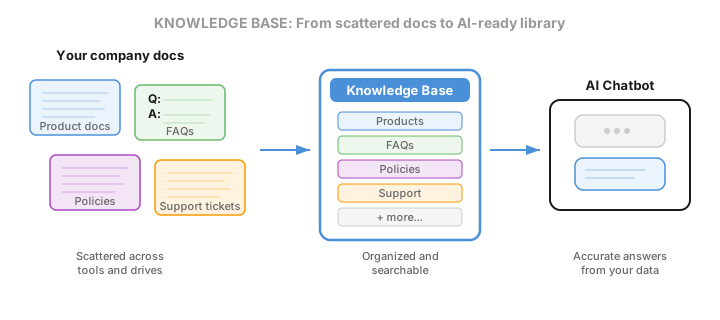
The key word is curated. A knowledge base isn’t the same as the vector store or search index used to retrieve from it (that’s #9 and #10). It’s the source of truth you maintain: choosing what goes in, keeping it up to date, and structuring it so AI can find the right answer.
Without a knowledge base, AI can only draw on its general training. With one, it becomes an expert on your company. When someone says “we need to build a knowledge base for the chatbot,” they mean collecting, organizing, and maintaining your internal information so the AI can reference it.
9. Embeddings & Vector Databases - Organizing knowledge by meaning, not keywords
When you add documents to a knowledge base, a specialized embedding model converts each chunk of text into an embedding: a list of numbers that captures its meaning. Imagine a map where every piece of content has a location. Similar ideas are close together, unrelated ones are far apart.
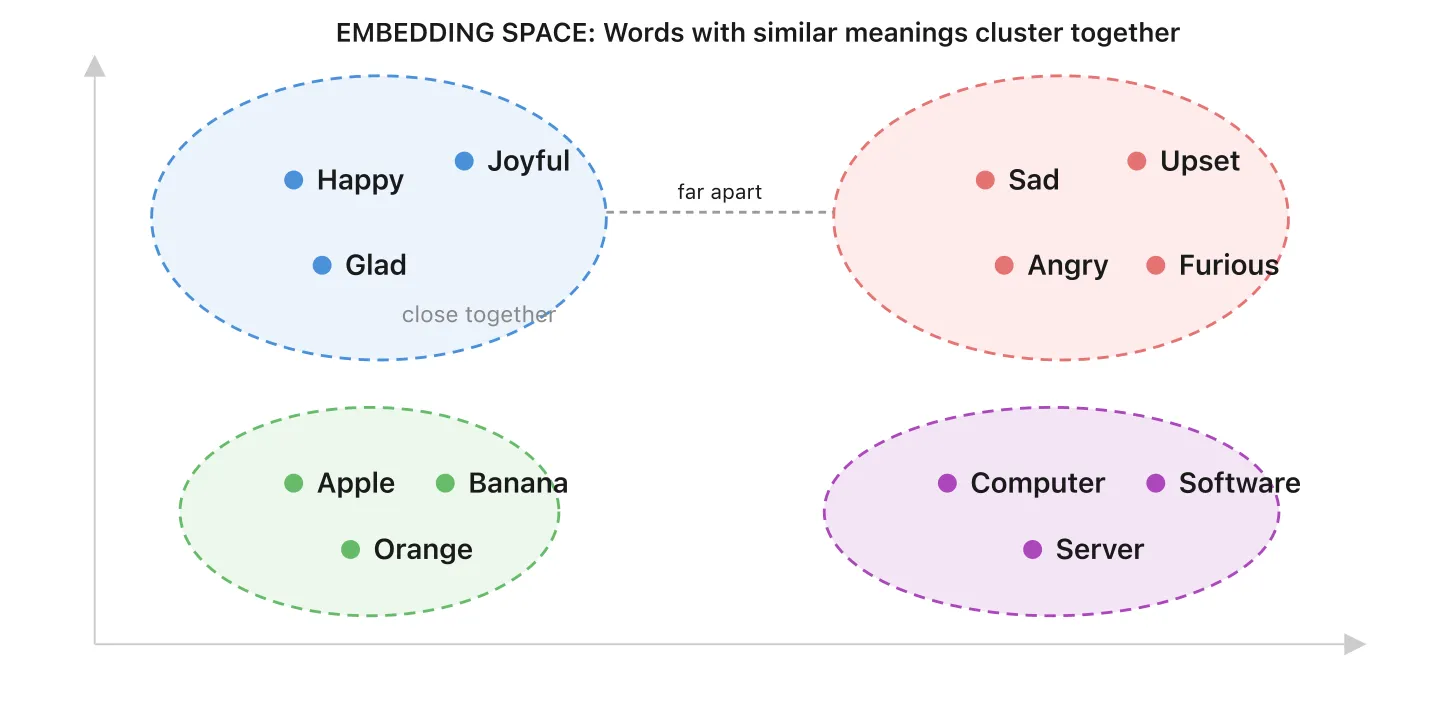
A vector database is where these embeddings live. It’s like a library where books are organized by meaning, not title. When a customer asks a question, the vector database finds the most relevant content by proximity on that map.
Traditional database: “Find me the row where category = 'returns'” (exact match)
Vector database: “Find me everything related to customer complaints about shipping” (meaning match)
In practice, most systems combine both approaches: vector search for finding relevant content by meaning, plus traditional filters (by date, category, or source) to narrow results. One doesn’t replace the other.
10. RAG - Giving AI a cheat sheet before it answers
RAG stands for Retrieval-Augmented Generation. Before the AI answers your question, it first searches your knowledge base to find relevant information. Then it uses that information to generate a grounded answer.
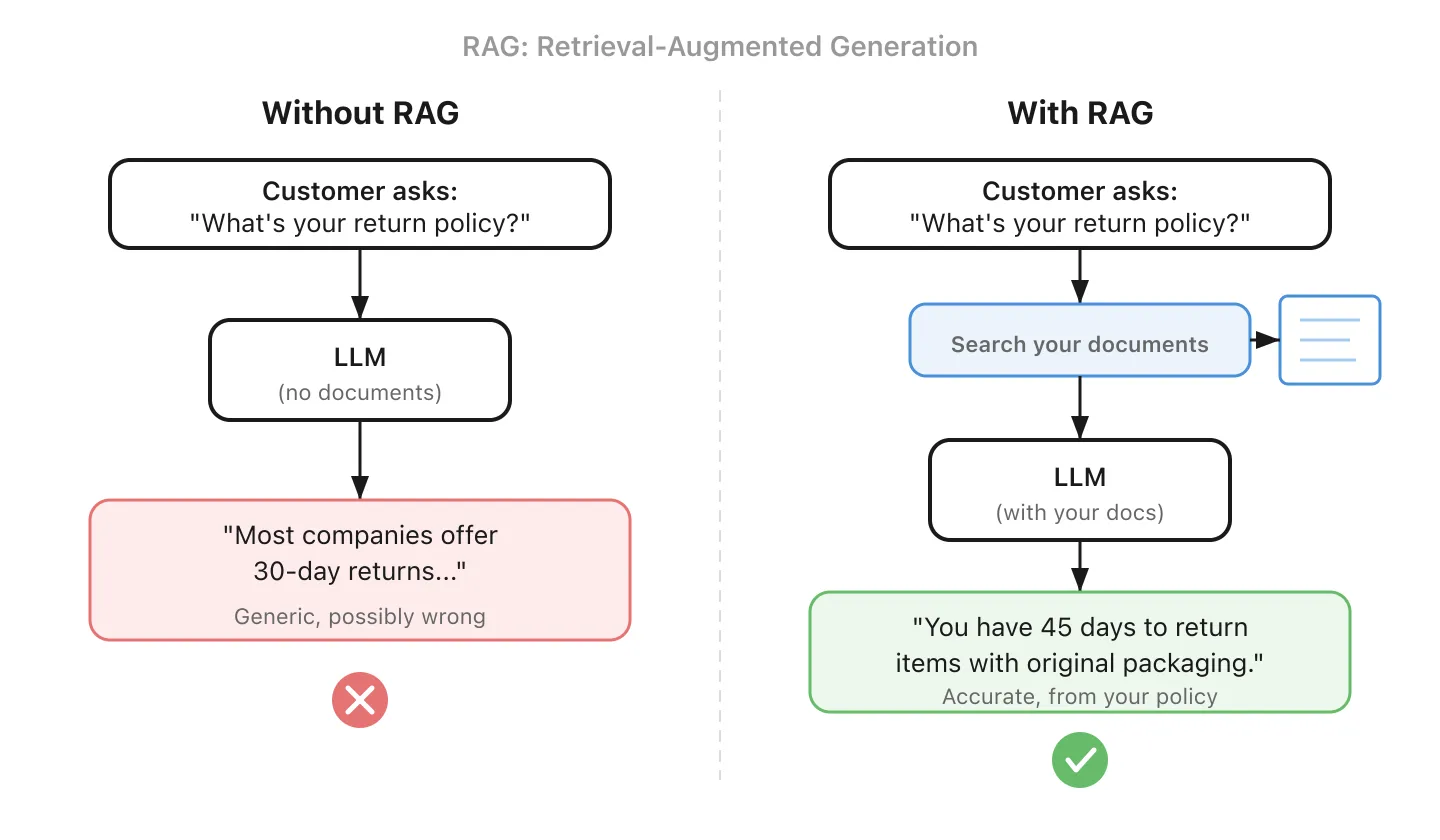
It’s the difference between an intern who’s winging it and one who checks the handbook first. RAG is how most businesses connect AI to their own data, and it’s usually a simpler starting point than fine-tuning (#5).
One important caveat: RAG is only as good as its retrieval. If documents are poorly chunked, missing metadata, or the search returns the wrong passages, the AI will confidently answer from the wrong source. Getting retrieval right (chunking strategy, metadata, re-ranking) is often the hardest part of building a RAG system.
11. MCP - A standard way to connect AI to your tools
MCP stands for Model Context Protocol. It’s an open standard that defines how AI models connect to external tools and data sources. Before MCP, every integration had to be custom-built. If you wanted your CRM data available to both a customer chatbot and an internal email automation, the connecting logic had to be written twice, one for each AI interface.
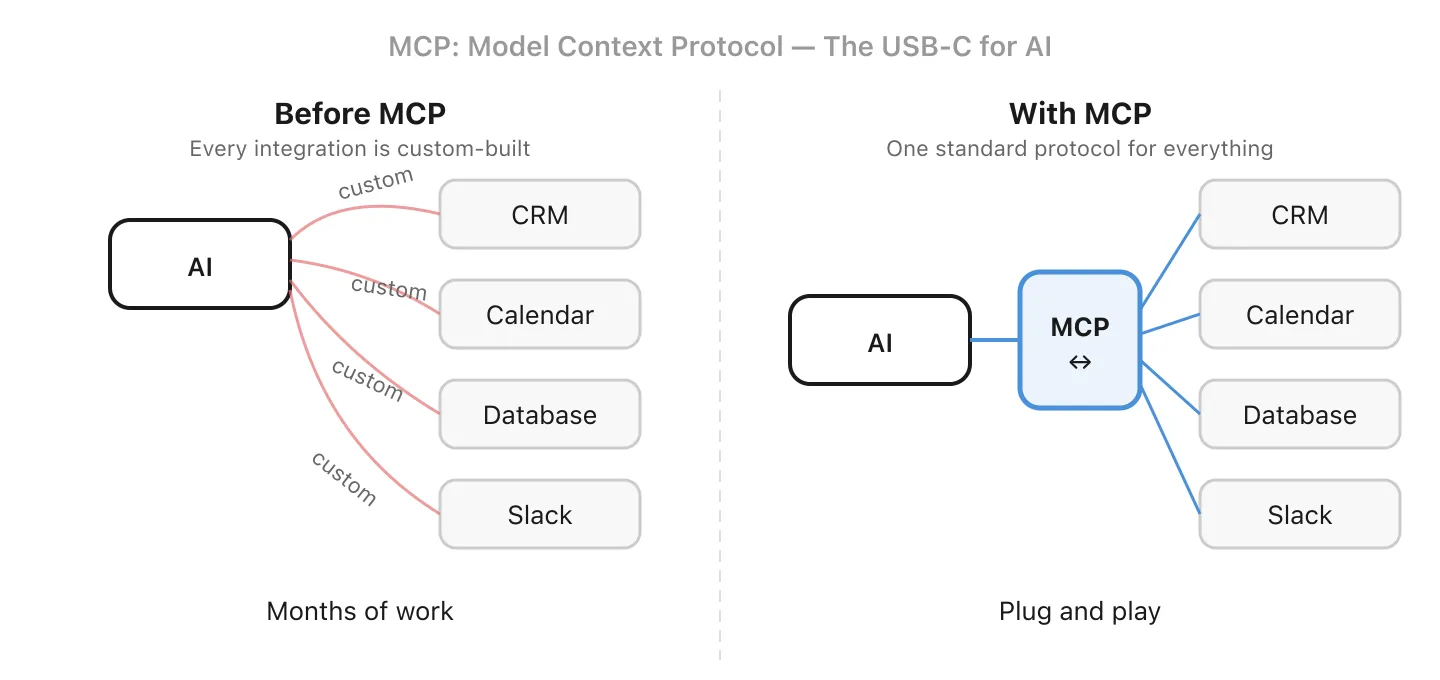
Think of it like USB-C for AI: a common interface that tools can implement so any compatible AI assistant can use them. Build one MCP server for your business data, and any MCP-compatible tool (your chatbot, your coding assistant, your email agent) can connect to it without duplicating work.
The standard is still maturing, and adoption depends on both the AI tool and the service implementing it. Key areas like authentication and permission scopes are actively evolving. But the direction is clear: standardized integrations instead of one-off custom code.
Part 4: The Frontier
These concepts are shaping how AI is built and used today.
12. Context Engineering - Designing what AI sees and when
Context engineering is a relatively new term that describes the practice of designing the full information pipeline around an AI system. It goes beyond prompt engineering (#3) to encompass:
- Routing: deciding which model or tool handles each request
- Memory management: summarizing or trimming conversation history to stay within the token budget
- Retrieval orchestration: pulling the right documents via RAG (#10) at the right moment
- Tool selection: choosing which integrations (#11) to invoke
- Output formatting: structuring responses for downstream systems
If prompt engineering is writing a good email, context engineering is designing the entire communication workflow. The term isn’t universally standardized yet, but the practice is quickly becoming essential as AI systems grow more complex.
13. AI Agent - AI that doesn’t just answer, it acts
A regular AI chatbot answers questions. An AI agent can actually do things: it breaks down a task into steps, decides which tools to use, and executes. You may already be using one: Claude Code writes and runs code across entire projects, and ChatGPT’s “operator” mode can browse the web and fill out forms on your behalf.
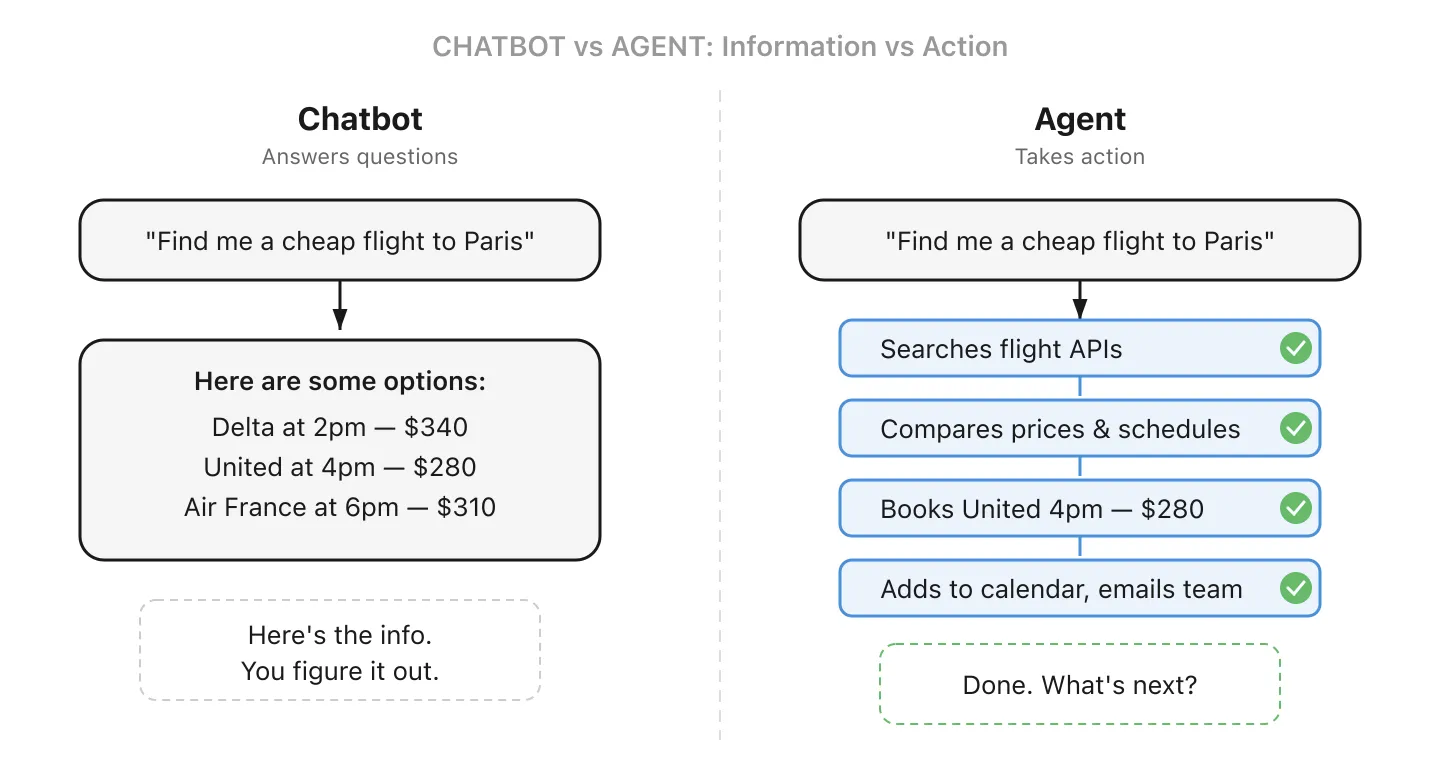
For a small business, an agent could monitor your “info@” email address, draft replies to common questions, and only alert you for the complex ones. Or it could process incoming invoices, match them against purchase orders, and flag discrepancies for review. The key difference from a chatbot: it takes action on your behalf, not just provides information.
14. Multimodal - AI that can see, hear, and read
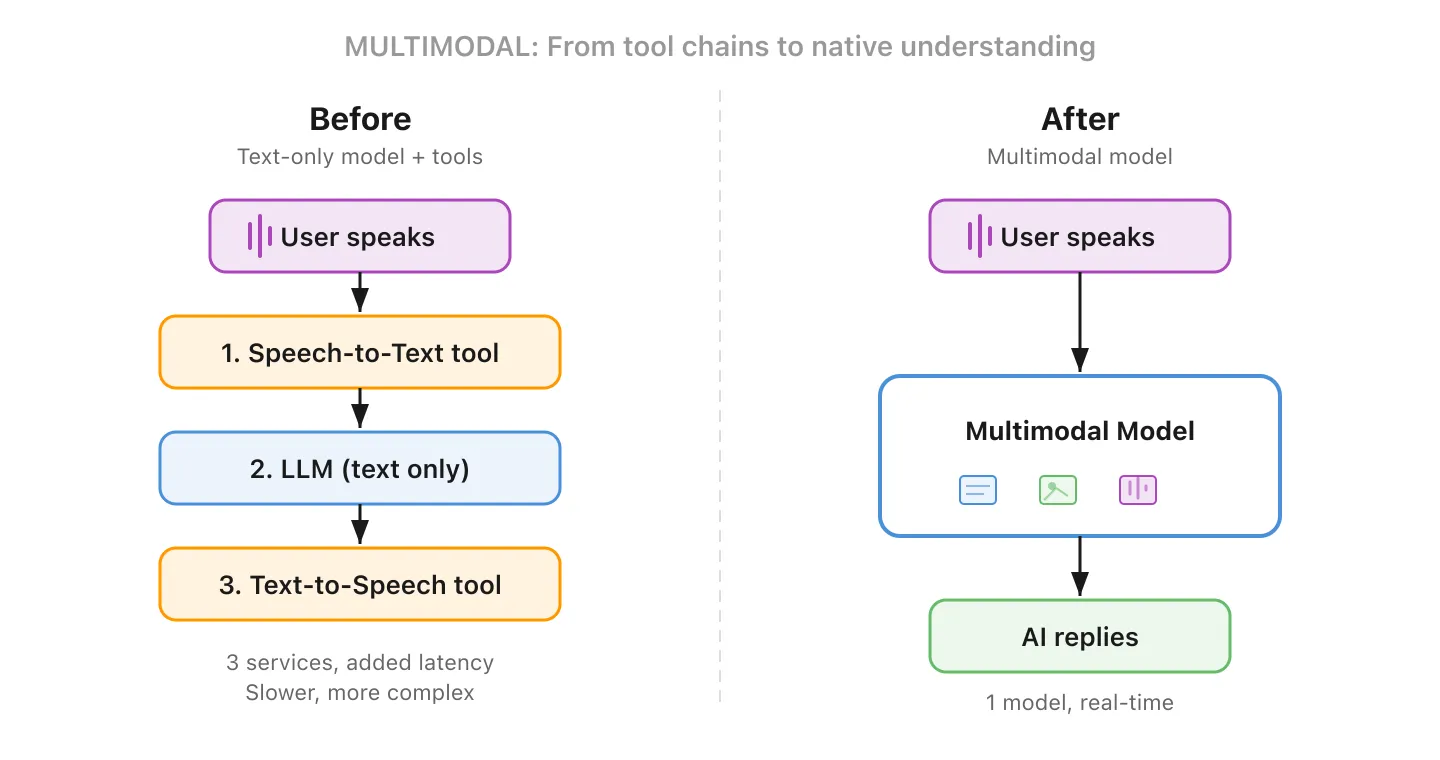
Most early LLMs could only process text. Multimodal models can work with multiple types of input and output: text, images, audio, and video. Show it a photo of a damaged product and ask it to write a claim. Give it a chart and ask it to explain the trends.
This is a bigger deal than it sounds. Before multimodal, building a voice-based AI assistant meant chaining separate tools together: a speech-to-text service to transcribe, an LLM to generate a reply, and a text-to-speech service to read it back. Each step added latency and cost. A multimodal model handles the entire flow natively, which makes real-time voice conversations feel natural instead of stilted.
15. Reasoning Model - AI that thinks before it answers
Most AI assistants answer directly. Reasoning models spend extra compute working through a problem step by step before responding, checking assumptions and catching errors along the way. Some expose this thinking visibly (like DeepSeek R1), while others (like OpenAI’s o3) reason internally and return only the final answer.
The tradeoff is time and cost for accuracy. Reasoning models shine for financial analysis, legal review, and data interpretation. For everyday tasks, standard models are faster and cheaper.
Wrapping Up
AI vocabulary can feel like a barrier, but most of these concepts map to ideas you already understand. The terms exist because the technology is genuinely new, not because anyone’s trying to confuse you.
The next time a vendor pitches you an “agentic RAG solution with MCP integrations and multimodal reasoning,” you’ll know exactly what they mean, and more importantly, you’ll know the right questions to ask.
Got a term I missed? Or one that still doesn’t make sense? Reach out to the Flowful team, we love helping businesses make sense of AI.