
“What if it makes something up?” is the question business owners ask us most about AI agents. The short answer: an agent makes things up when it lacks context. ChatGPT and Claude know nothing about your company until you connect them to your data.
Key takeaways
- It is all about context. An agent invents answers when it lacks information, not because the technology is broken.
- ChatGPT alone does not know your company. Connected to your documents and live data, the same model gives useful answers.
- When context runs out, the agent should say so, and pass the question to a person.
- Keep a human in the loop. Where mistakes are costly, the agent drafts and a person edits and sends.
- Testing shows the gaps. Every wrong answer points to context the agent was never given.
Why AI agents make things up
A model is built to write fluent, plausible text. It has never read your return policy, but it knows what return policies usually say, so it writes one.
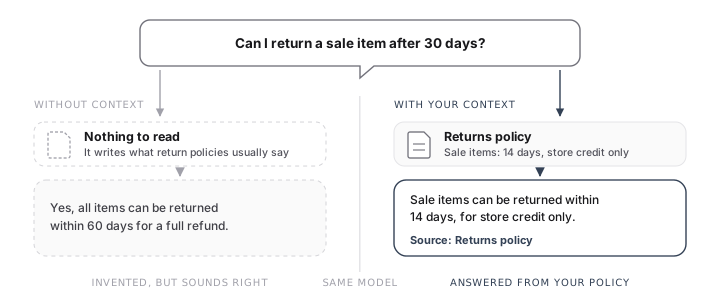
The stakes are real: in 2024 a Canadian tribunal held Air Canada to a bereavement fare policy its chatbot had invented.
Give it two kinds of context
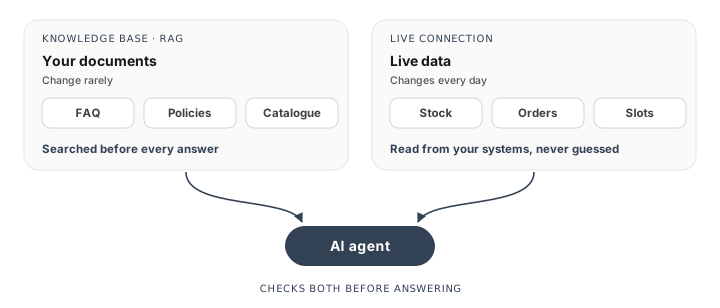
- Documents: before each answer, the agent searches your knowledge base and answers from the passages it retrieves. This is called RAG, retrieval-augmented generation. Answers are only as good as your content. If two pages give different opening hours, the agent will pick one, so cleaning up is part of the project.
- Live data: if a number or a date could change tomorrow, the agent reads it from your systems. It never makes it up.
When context runs out, say so
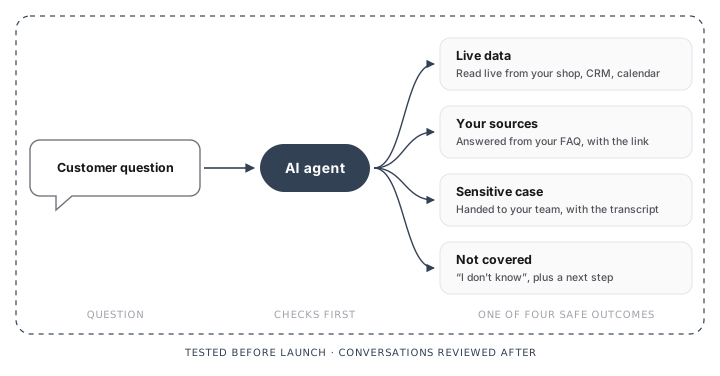
Left to itself, a model would rather say something than nothing. A well built agent checks first, and when neither your documents nor your systems have the answer, it says “I don’t know” or hands the conversation to your team, transcript included.
Keep a human in the loop
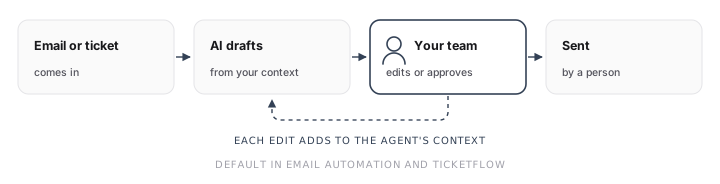
Where a wrong answer would cost you, the agent should draft and a person should decide. That is why Email Automation and TicketFlow draft replies by default: your team edits or approves each one before it goes out. Every edit also tells you what to add to the agent’s context.
Test to find the gaps
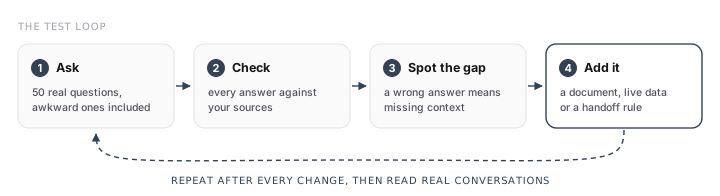
Before launch, run fifty real questions through the agent. After launch, read the conversations. Each wrong answer tells you what to add.
What does not work on its own
| Fix | What it does | Why it is not enough |
|---|---|---|
| ”Do not invent anything” in the instructions | Makes the model more cautious | A sentence cannot supply missing information |
| Turning down the “temperature” | Makes answers more consistent | An agent can be consistently wrong |
| A newer, bigger model | Hallucinates less often | It still fills the gaps |
The model is not the problem, the context is
You can use ChatGPT today. But it has never read your policies or your customer history, so it can only answer in general terms. We build on the same models, and our job is connecting them to your company data and tools, then running the agents:
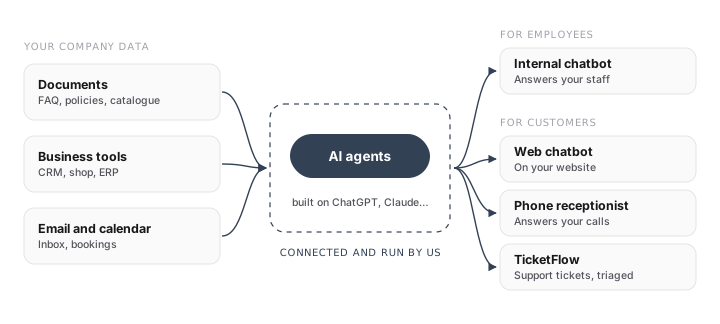
For employees, that means an internal chatbot. For customers, a web chatbot, an AI phone receptionist and TicketFlow.
Tell people they are talking to an AI
Since 2 August 2026, the EU AI Act requires AI agents that talk to people to say so from the first interaction. Our EU AI Act guide for SMEs covers the rest.
Conclusion
An agent that makes things up was asked to answer without the context to do it. Connect it to your data, let it say “I don’t know”, keep a person on the decisions that matter, and keep testing.
That is the work we do. To see what it would take for your business, book a discovery call.