
Your AI agent answers from what it reads. Give it five years of PDFs, two versions of the returns policy and a page that says “see above”, and it answers badly, however good the model is.
A knowledge base an AI can use is mostly a well-written FAQ. Anyone on your team can write one.
Key takeaways
- Start from real questions, not from the files you already have.
- One topic, one answer. Two pages that disagree give you an agent that picks one.
- Every passage must stand on its own. The AI reads a few paragraphs, never the whole page.
- Keep live data and confidential data out. Prices and orders are read from your systems. Salaries and contracts stay out entirely.
- Markdown and JSON first, scanned PDFs and images last.
- Keep it current: each page gets an owner, and each unanswered question becomes a page.
How the AI reads your knowledge base
Before each answer, the agent searches your knowledge base, pulls out the few passages that best match the question and answers from those. This is called RAG. It is how ChatGPT or Claude can answer questions about your company: the model is the same, the context is yours.
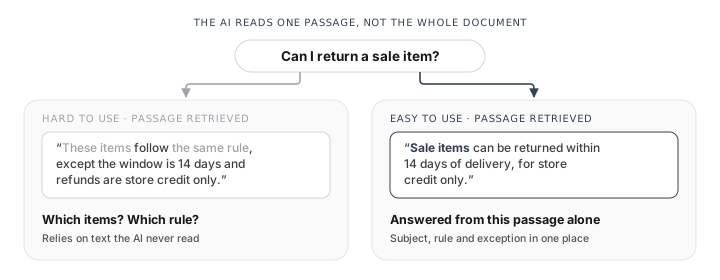
The AI never sees the whole page. A passage that leans on the paragraph above it loses its meaning on the way.
1. Start from the questions people actually ask
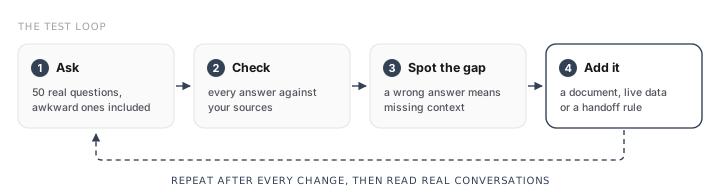
Do not upload every file on the shared drive. List fifty real questions from your support inbox, contact form, phone calls and sales team, and check that each one has a clear answer somewhere. The gaps are the first pages to write.
2. One topic, one answer
If your website says you open at 9:00 and a PDF from 2023 says 8:30, the agent will pick one. Delete duplicates, old versions and anything outdated instead of adding a newer page next to them.
Duplicates cost you even when they agree. The agent reads only a few passages per question, and three copies of the same paragraph take the place of two other passages it needed.
3. Write passages that stand on their own
Each section should make sense if it is the only thing the agent reads. A quick test: give the passage, and nothing else, to a new colleague. If they cannot answer the question with it, the agent cannot either.
- Repeat the subject. “Sale items can be returned within 14 days” beats “These items follow the same rule”.
- Phrase headings like the question. “Can I change my delivery address?” beats “Miscellaneous”.
- Keep one idea per section. A paragraph mixing returns, delivery and warranty matches no question well. In a FAQ, that means one question per entry, each with its own answer.
- Write the conditions in. “Delivery takes 2 days” is true until someone orders from Switzerland. Say who it applies to and the exceptions.
4. Keep live data and confidential data out
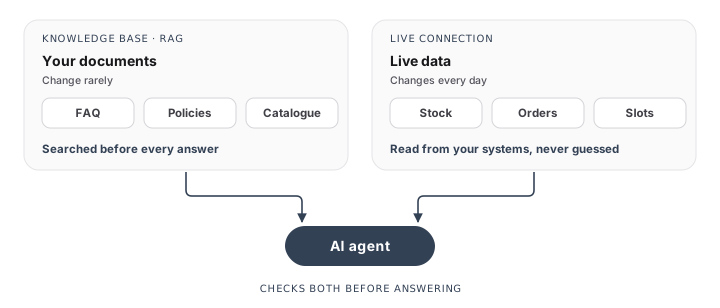
Prices, stock, order status and free slots change every day. Copied into a document, they are wrong by next week. The knowledge base explains how things work. Your shop, CRM or calendar says where things stand today, and the agent reads them through a live connection.
The same goes for anything confidential: salaries, client contracts, personal data, internal notes. Whatever sits in the knowledge base can end up in an answer.
5. Choose formats the AI can read
From easiest to hardest:
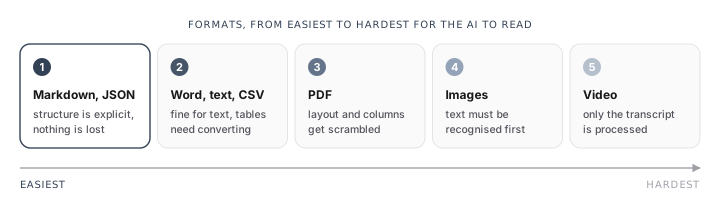
- Markdown and JSON. The structure is explicit, so nothing is lost.
- Word documents, plain text and CSV. Fine for text. Tables are the catch: once split into passages, a row loses its column headers, and “42, 3, yes” means nothing. Converting each row to JSON keeps the headers next to the values.
- PDF. Usable when the text can be selected. Layout, columns and footnotes often come out scrambled.
- Images. Text inside a picture or a scan has to be recognised first, and errors creep in.
- Videos. Only the transcript is processed. What is shown on screen and never said is lost.
Here is what the table problem looks like. A row from a CSV file, read on its own:
Oak chair,42,3,yesThe same row as JSON:
{
  "product": "Oak chair",
  "in_stock": 42,
  "delivery_days": 3,
  "returnable": true
}
The second one still makes sense when it is the only thing the agent reads.
6. Name and sort your files
The file name is often the first clue the agent gets about a passage. returns-policy-2026.md tells it something. doc_final_v3.pdf does not.
If several agents share the work, say one for customer support and one for sales, put each agent’s content in its own folder. Each agent then searches only what concerns it.
7. Write down the limits
List the topics that go to a person (complaints, large refunds, legal or medical questions) and what the agent says when it does not know. Those rules let it say “I don’t know” instead of making something up.
8. Keep it current
Give each page an owner and a review date, and update it when the policy changes, not three months later. Then test: every question the agent gets wrong points to a page to add or fix.
Before and after
| Before | After |
|---|---|
| “See conditions above.” | “Sale items can be returned within 14 days of delivery, for store credit only.” |
| Heading: “Miscellaneous” | Heading: “Can I change my delivery address?” |
| Two pages with different opening hours | One page, with an owner and a review date |
| A price list pasted into a PDF | Prices read live from your shop |
A scanned brochure called doc_final_v3.pdf | The same content in Markdown, called returns-policy-2026.md |
Where we come in
Most of this you can do yourself, and it pays off whatever tool you use. When we set up a web chatbot, we connect your website, documents and FAQ to Vectoria, the platform behind our packages. We convert your tables and files into formats the agent reads well, filter out confidential content and anonymise personal data. Then we test the agent on your real questions and show you which pages to fix first. The same knowledge base can then feed other channels, such as email replies.
To see how your current content would hold up, book a discovery call.