
Most AI agents on a website answer no better in month six than on launch day. The model is not the problem. The answers that missed were never corrected, and the questions the agent could not answer went to someone on your team, got a good reply, and that reply never made it back to the agent.
An AI agent that gets better every week closes that loop. There are two ways in: customers flag the answers that missed, and your team’s replies to tickets become new FAQ entries.
Key takeaways
- What grows is the knowledge base. The agent reads it before every answer, and every new entry makes it more useful.
- A thumbs down is a lesson. When a customer flags an answer, you see exactly what the agent did not know, and you write the right answer once.
- A ticket reply is a lesson too. One click when closing the ticket, and the AI turns your reply into a FAQ entry you can edit before adding it.
- A person decides what goes in. Only answers your team wrote, or chose to share, reach the knowledge base.
- Some questions should stay with people. Complaints and refunds are handed over by design, not by failure.
What actually gets better
The agent answers from a knowledge base: your FAQ, policies and documents, searched before each answer. That is the part that grows, one entry at a time. Every entry can be read, edited and deleted, so you always know what the agent knows, and you can take something back the day it stops being true.
If you have not built that knowledge base yet, start with how to write one an AI can actually use.
Two ways the agent learns
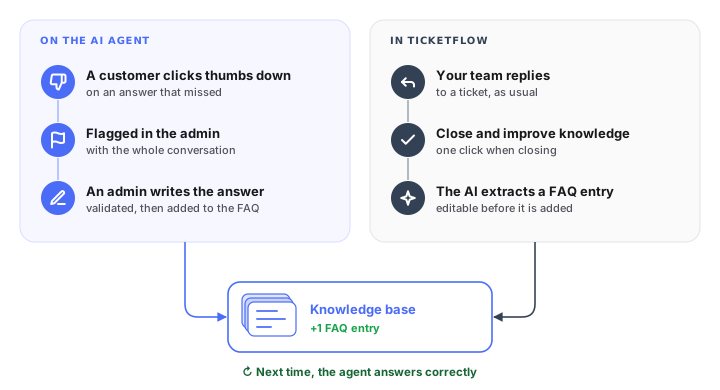
Corrections come from two places: the chat itself, and your helpdesk. When the agent and TicketFlow are set up on the same knowledge base, both feed it.
On the agent: the thumbs down
Customers can rate every answer of the Web Chatbot agent with a thumbs up or a thumbs down.
- A customer clicks thumbs down. The answer was wrong, vague, or the agent simply did not know.
- It shows up in the admin. You see the question, the answer the agent gave and the conversation around it.
- An admin writes the right answer. A sentence or two, in your own words.
- It is validated, then added to the FAQ. The next customer who asks gets the right answer.
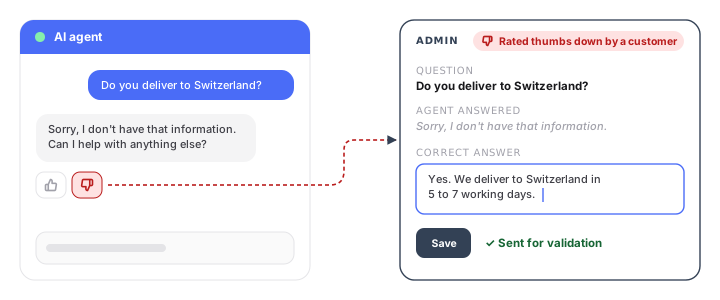
A thumbs down is the cheapest feedback you will get. The customer has already told you which question matters to them and that the answer was not good enough. All that is left is to write the answer once.
In TicketFlow: close and improve knowledge
When the agent cannot answer, it hands the conversation to your team. In TicketFlow, our helpdesk, it arrives as a ticket with the full chat attached.
- Your team replies to the customer, as usual.
- They close the ticket with “Close and improve knowledge” instead of a plain close.
- The AI extracts a FAQ entry from the reply they just wrote: a reusable question and answer.
- They check it and add it to the knowledge base. The entry can be edited first. The answer your colleague wrote once now serves every customer who asks.
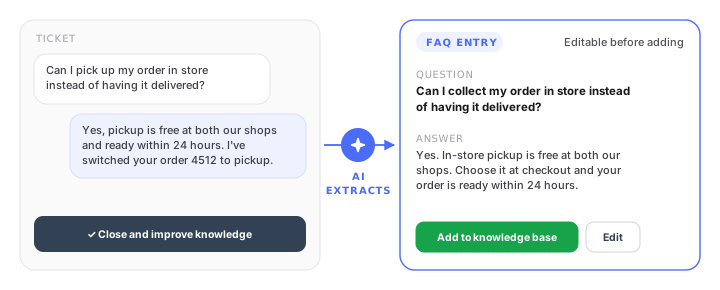
Your team does not have to write documentation on the side. They answer the customer, and the knowledge base grows from work they were doing anyway.
When to use it, and when not
Your team’s replies are full of things that should not become rules. A goodwill refund for a loyal customer. A delivery promise made because the warehouse was quiet that week. For those tickets, a plain close is the right choice. Keep “Close and improve knowledge” for answers that are true for every customer.
The same goes for the admin side: write the answer you would give anyone, not the exception you made once. And give the job to the person who owns the topic: returns to whoever owns returns, opening hours to whoever runs the shop.
What to watch each week
Ten minutes a week is enough to see whether the loop is working:
- Thumbs down and handovers by topic. If the same topic keeps coming up, one good page will cover dozens of conversations.
- Flagged answers nobody has corrected. A thumbs down left in the admin helps nobody.
- Questions asked again after an entry was added. The entry exists but the agent does not find it, often because its wording is far from how customers ask.
What the loop does not fix
Some handovers are not gaps. A complaint, a large refund or a legal question should reach a person every time, and no knowledge entry should change that. Those rules are part of how you stop an AI agent from making things up.
The loop also does not help with live data. If customers keep asking where their parcel is, the fix is a connection to your shop or delivery system, not a knowledge entry that will be wrong tomorrow.
Where we come in
We set up our Web Chatbot agent and TicketFlow together for this reason: the agent handles what it knows, your team handles the rest in one inbox, and when both are set up on the same knowledge base, the thumbs down and the ticket replies both make the agent better.
Want to see the loop on your own questions? Book a discovery call.