TicketsFlow AI helpdesk software

The AI helpdesk that reads every ticket before your team does

TicketsFlow is a shared inbox for support teams. Each email, chat or form arrives with a summary, a sentiment, suggested labels and a reply drafted from your own order, product and delivery data. Your agents review, edit and send.

From €149 a month, AI included for every agent.

GDPR-ready
EU-first hosting
DPA available
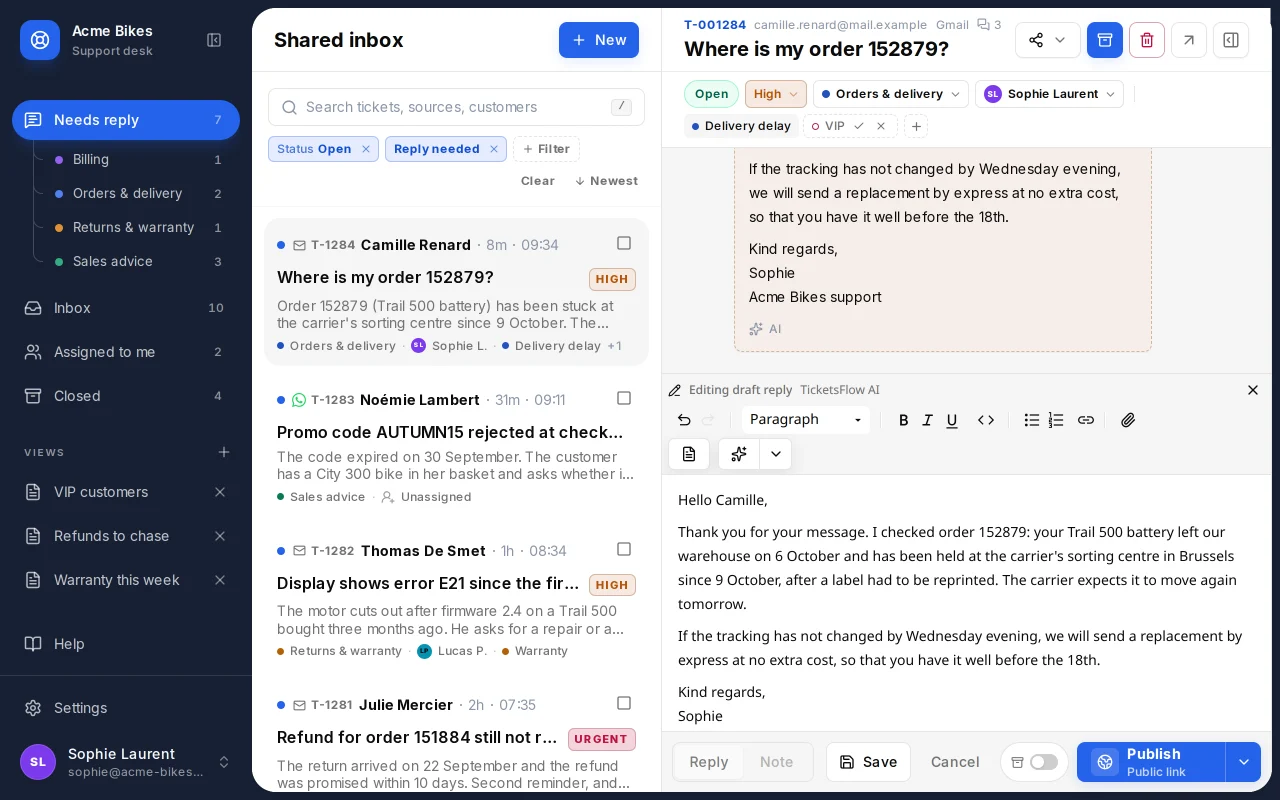
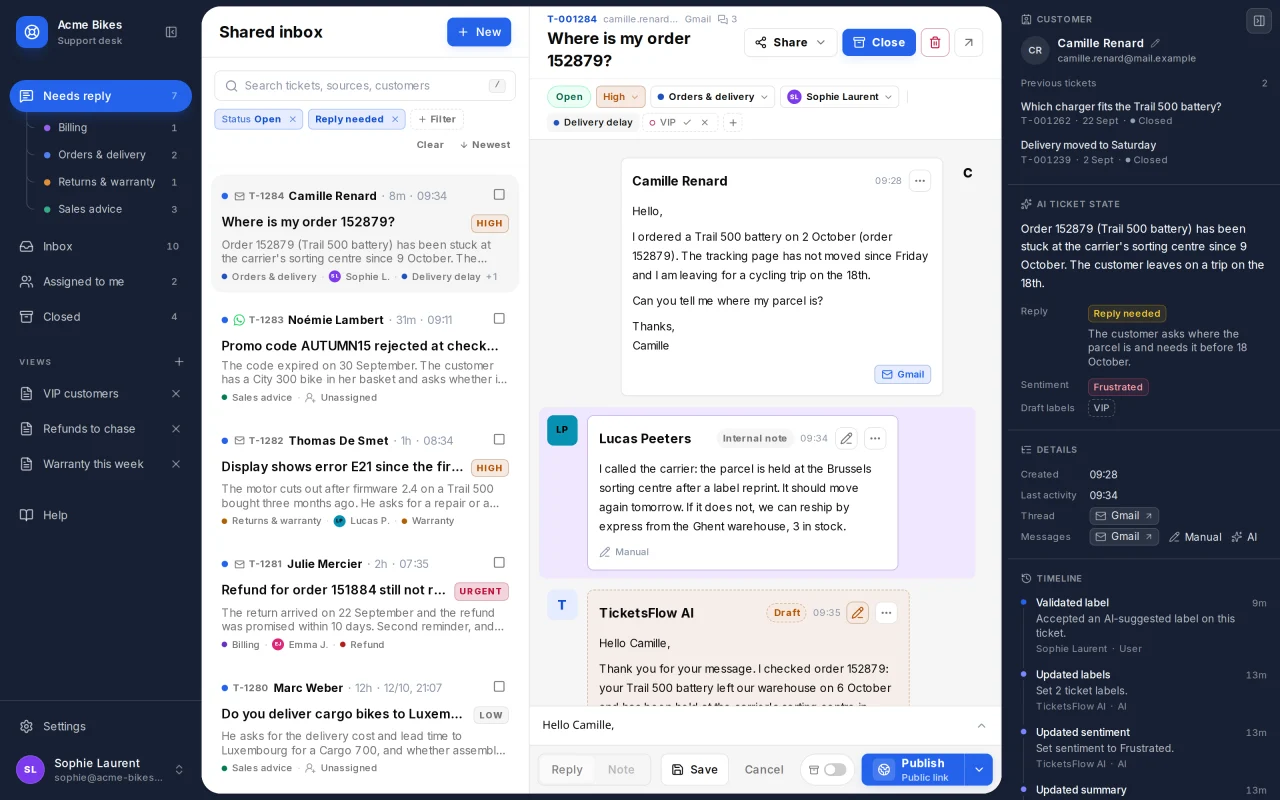
TicketsFlow shared inbox: a list of support tickets with AI summaries, an open conversation about a delayed order, and the AI ticket state panel showing summary, reply status and sentiment.
  1. Queue, labels and assignee set by your rules
  2. Summary, reply status and sentiment, written on arrival
  3. A reply already drafted from the order data

The product itself, shown with demo data.

a month to start, for up to 5 agents
€149
extra per agent for AI: it is in every plan
€0
weeks from the first call to a live desk
2 to 4
interface languages: English, French and Dutch
3
Product tour

What your team works in all day

Six screens, taken from the product. Pick one, or let them play.

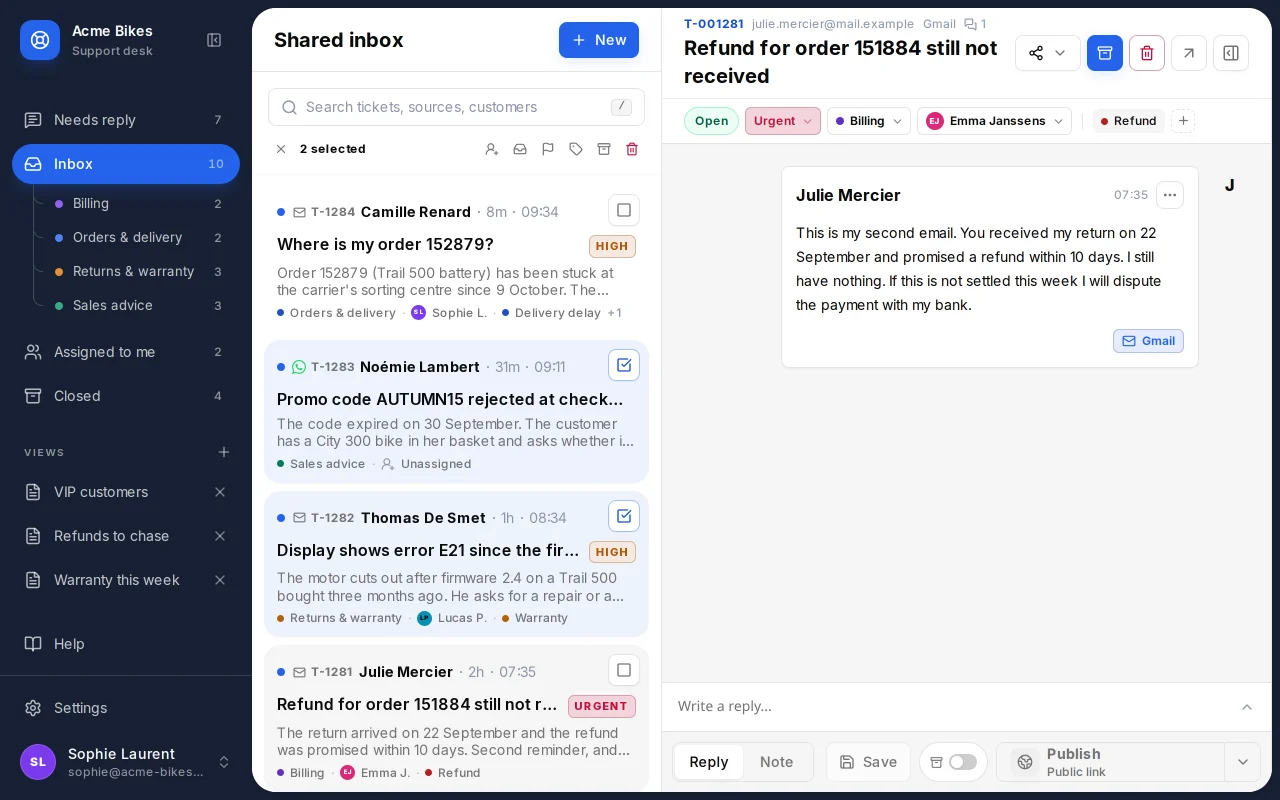
TicketsFlow inbox with tickets grouped by queue, each showing customer, priority, AI summary, queue and assignee.

One inbox the whole team works from

Needs reply, Inbox, Assigned to me and Closed, split by your own queues. Each ticket shows a one-line AI summary, so triage happens without opening anything.

  • Queues with round-robin assignment
  • Priority, labels and bulk actions
  • Saved views, with an alert when a ticket matches
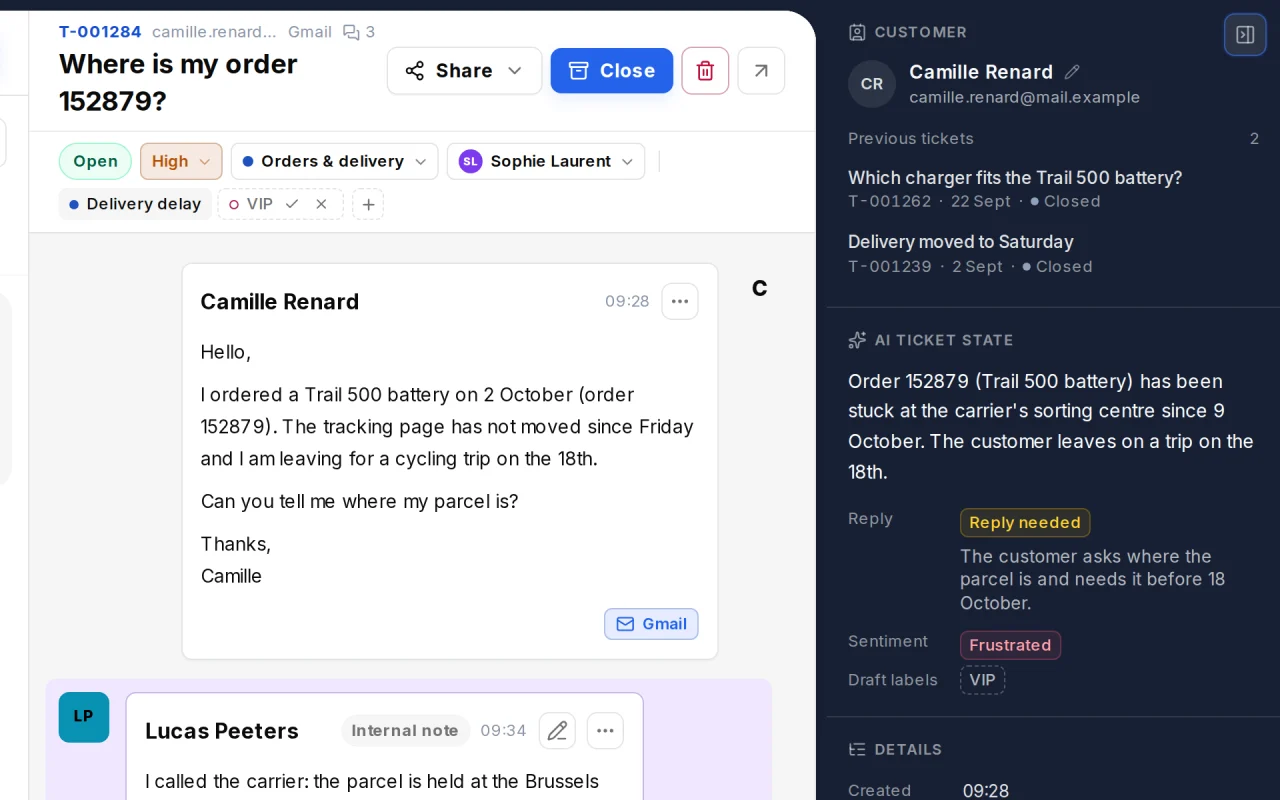
TicketsFlow context panel showing the customer, previous tickets, the AI ticket state with summary, reply needed, sentiment and draft labels, and the timeline.

Understood before anyone opens it

The context panel holds what the AI read in the thread: a short summary, whether a reply is still needed and why, the customer's tone, and the labels it suggests.

  • Suggested labels stay drafts until an agent validates them
  • The customer's previous tickets sit beside the conversation
  • Every AI and human action is in the ticket timeline
TicketsFlow conversation with a customer email, a private note from a teammate and an AI-drafted reply ready to review in the composer.

A reply waiting in the composer

An automation leaves an editable draft built from the thread and from your systems: order status, stock, delivery tracking. Nothing reaches the customer until an agent sends it.

  • Write, or rewrite with instructions and a diff of the changes
  • Translate any message into the interface language
  • Templates, signatures and private notes for the team
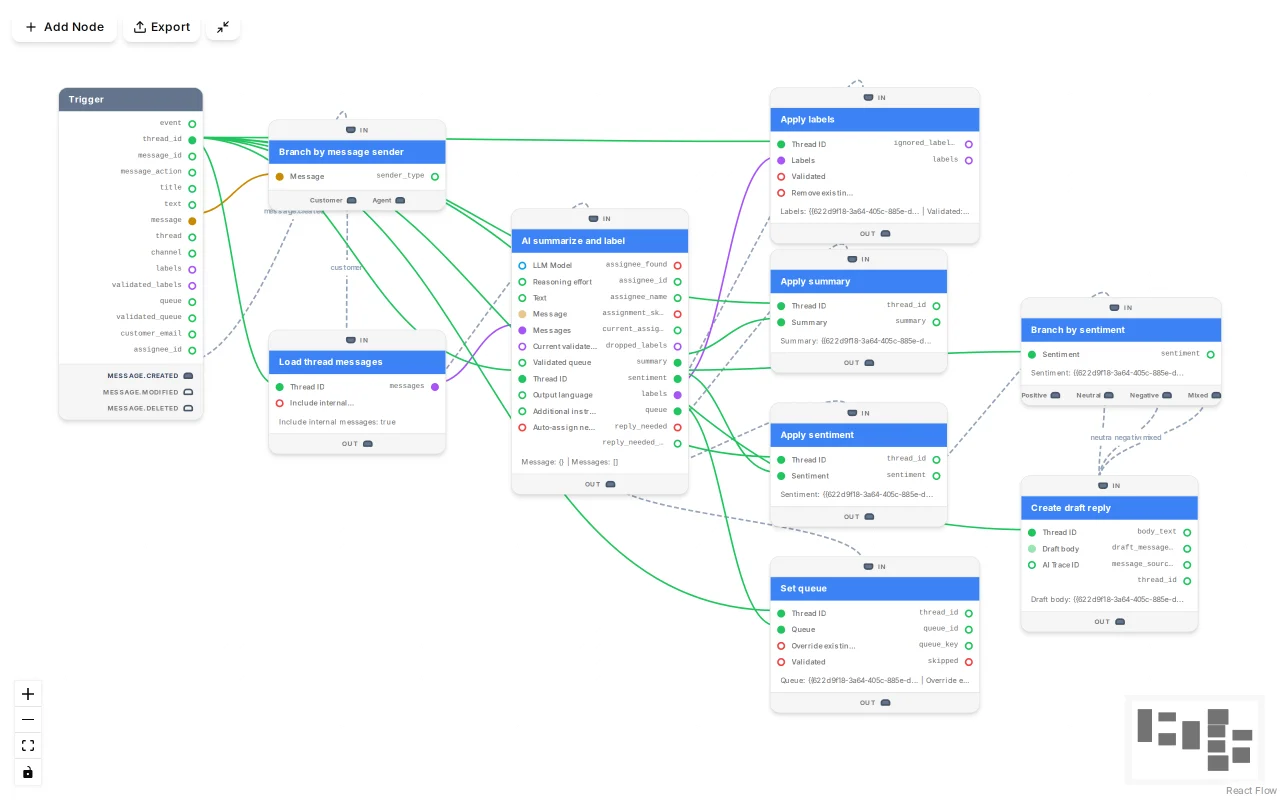
TicketsFlow automation editor showing a workflow graph that loads a thread, summarises and labels it, sets the queue and creates a draft reply.

Rules you can see, test and roll back

Summaries, labels, routing and drafts come from workflows you can open. Each one is a graph: change a step, run it against a real ticket with nothing saved, then publish.

  • Branch on sentiment or on who sent the message
  • Numbered versions, with diff and restore
  • Run logs that replay each execution on the graph
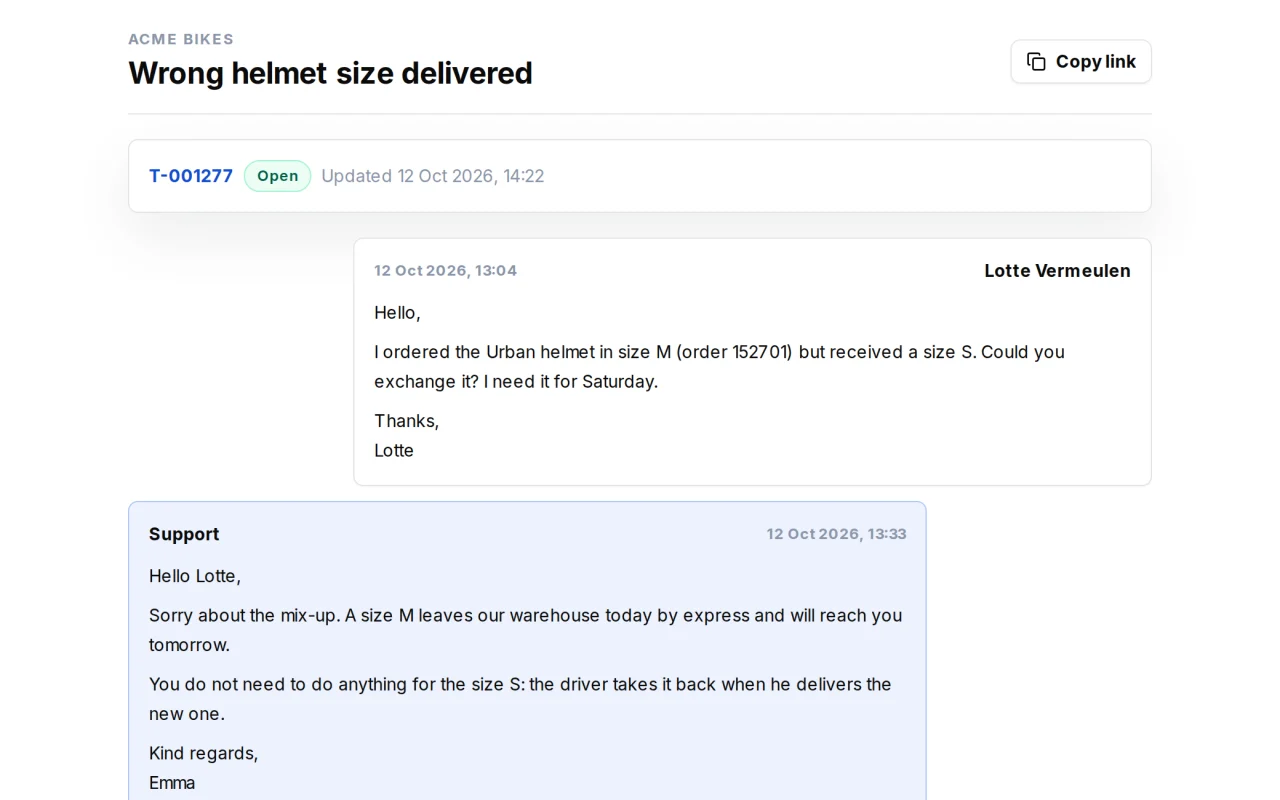
TicketsFlow public ticket page as a customer sees it: the ticket title, its status, the published messages and a reply box.

Customers and partners, without an account

Each ticket has a public page where the customer reads the published replies and answers back. Bring in a supplier with a personal link, or open tickets through a public form.

  • Private notes and drafts never appear on the public page
  • Collaborator links expire after 30 days
  • Intake forms with required fields and an optional password
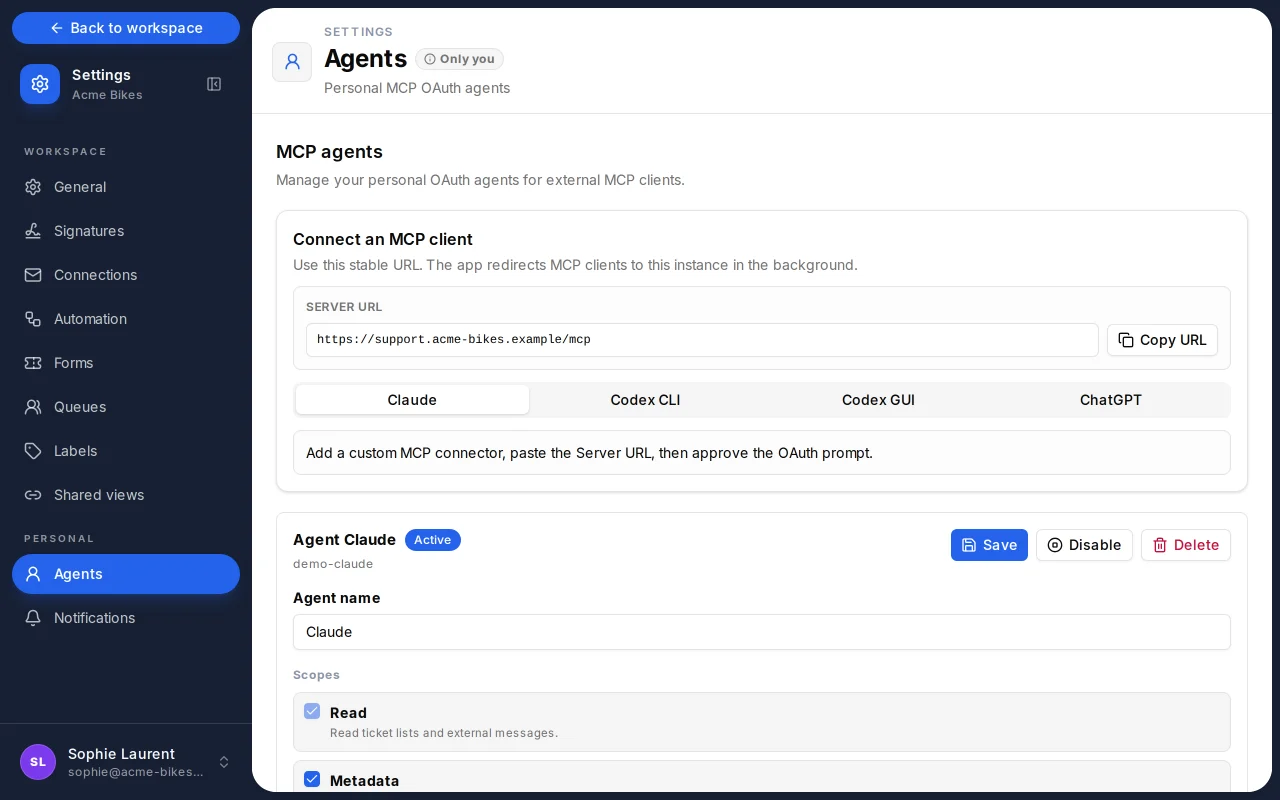
TicketsFlow agents settings showing the MCP server URL and the setup tabs for Claude, ChatGPT and Codex.

Let Claude or ChatGPT work the queue with you

TicketsFlow is an MCP server. Connect an AI client with your own role and the scopes you choose: it can search tickets, triage them and prepare replies.

  • Ready-made setup for Claude, ChatGPT and Codex
  • Scopes capped by your role: read, notes, drafts, ticket edits
  • A connected client can draft a reply, never send one
Connected

Tickets come in from everywhere. Answers come from your systems.

A ticket keeps the source of the thread and of each message, so an agent always knows which mailbox a reply leaves from.

Where tickets come from

  • Gmail and Google Workspace mailboxes
  • WhatsApp Business, Slack, Telegram, Microsoft Teams, Discord
  • Conversations handed over by your website chatbot
  • Public intake forms and the customer ticket page
  • Requests logged by an agent after a phone call

What the AI can look up

We build the source tools that read your own systems, so a draft says where the parcel is rather than promising to check.

  • Shopify
  • WooCommerce
  • PrestaShop
  • Odoo
  • HubSpot
  • Salesforce
  • Bpost
  • Mondial Relay
  • and your own API
Also included

The details a support team notices in week two

None of these is an add-on.

  • Learns from closed tickets

    Close a ticket with "Close and improve knowledge" and the AI drafts a reusable question and answer for your knowledge base.

  • Keyboard first

    j and k to move through the list, r to reply, / to search. No modifier keys to learn.

  • Notifications that respect your attention

    Browser and phone alerts for new tickets, replies on your tickets, or only the saved view you care about.

  • Delivery you can trust

    Each reply shows whether it is queued, sending, sent or failed, with the provider's reason and a retry.

  • Roles for a real team

    Viewer, author, manager and admin. Managers own queues, labels, forms and automations.

  • Shared views for the outside

    Publish a live, read-only ticket list to a client or a supplier, and revoke the link when you are done.

Pricing

Priced on volume, not per seat

Three plans sized by team and ticket volume. Summaries, drafts, sentiment and automations are in all of them.

  • Small team

    €149/month

    Up to 5 agents, 1,000 tickets/mo

  • Growing team

    €499/month

    Up to 20 agents, 4,000 tickets/mo

  • Support department

    €999/month

    Up to 50 agents, 10,000 tickets/mo

  • AI on every ticket, for every agent
  • Hosting, monitoring and updates
  • Knowledge base and source tools maintained

One-time setup from €1,500: channels, queues, labels, automations and your source tools.

Beyond a plan's volume: €0.15 per extra ticket.

What the setup covers
Data and hosting

Your customers' messages stay yours

  • Hosted in Germany

    The application, its database and its backups run on servers in Germany. EU-only AI models are available on request.

  • Never used for training

    Your tickets are never used to train or fine-tune an AI model, ours or anyone else's.

  • A DPA with every contract

    Every contract includes a GDPR data processing agreement that lists our sub-processors.

How we handle security and data
FAQ

Questions about TicketsFlow

What is TicketsFlow?

TicketsFlow is an AI helpdesk built by Flowful AI. It is a shared inbox for support teams where every incoming email, chat or form becomes a ticket with an AI summary, a sentiment, suggested labels and a drafted reply. Agents assign, answer and close tickets from one workspace.

Does the AI send replies on its own?

No. Everything the AI produces is a suggestion: a draft reply waits in the composer, and suggested labels stay drafts until an agent validates them. A human sends every message. The same holds for AI clients connected over MCP, which can prepare a reply but cannot send one.

Which channels does TicketsFlow support?

Email through Gmail and Google Workspace mailboxes, chat providers such as WhatsApp Business, Slack, Telegram, Microsoft Teams and Discord, conversations handed over by a website chatbot, public intake forms, and requests an agent logs after a phone call.

Can the AI use our order, stock or delivery data?

Yes. During setup we build source tools that read your webshop, ERP, CRM or carrier, so a draft can state the real order status or tracking step. Connectors exist for common platforms and we build custom ones against your own API.

How much does TicketsFlow cost?

Plans start at €149 a month for up to 5 agents and 1,000 tickets, with a one-time setup from €1,500. AI features are included in every plan: there is no per-agent AI fee.

Which languages does it work in?

The interface is available in English, French and Dutch, and each agent picks their own. Any message can be translated into the agent's interface language from the conversation, so a Dutch-speaking agent can handle a French ticket.

Can we move over from Zendesk, Freshdesk or a shared mailbox?

Yes. We connect your mailboxes, rebuild your queues and labels, and import your knowledge base during setup. Most desks are live within 2 to 4 weeks; a large ticket history to migrate can extend that.

Where is our data hosted?

On servers in Germany: the application, its database and its backups. EU-only hosting, with AI models served from EU regions, is available on request. Your tickets are never used to train an AI model, and every contract includes a data processing agreement.

See TicketsFlow on your own tickets

Book a 30-minute demo. Bring a few real tickets and we will show how they would be handled.

Book a demo