Ask ChatGPT or Claude “what did we quote client X in March?” and you get a shrug: the answer sits in your CRM, drive or inbox, not in the model. In 2026, both assistants can connect to those tools. Here is what that unlocks, what it costs, and the three questions to settle first.
What is MCP, and why it matters now
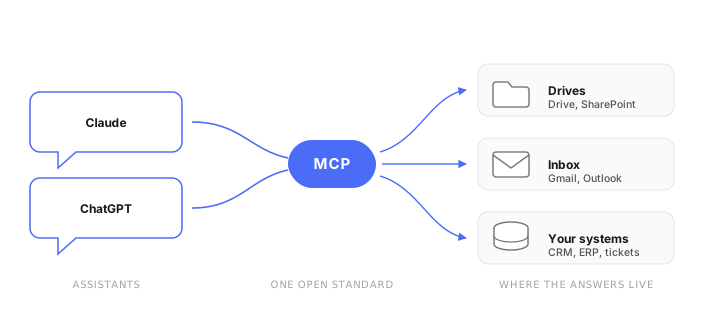
The Model Context Protocol (MCP) is an open standard that lets an AI assistant read from, and act in, your other software through one common kind of connector. Anthropic released it in late 2024, OpenAI adopted it in March 2025, and Google and Microsoft followed. In December 2025 Anthropic handed it to the Agentic AI Foundation, a new Linux Foundation body whose platinum members include AWS, Google, Microsoft and OpenAI, so no single vendor owns the standard any more. It is still moving fast: a major revision landed on 28 July 2026, and thousands of ready-made connectors now exist. Think of it as USB-C for AI: one plug, and any assistant can talk to any tool that speaks it. Our AI glossary explains it alongside the other terms you will hear from vendors.
Concretely:
- Claude has a connectors directory with more than 800 integrations (Google Drive, Gmail, Outlook, SharePoint, Slack, Notion, Jira and so on), plus support for custom connectors on every plan.
- ChatGPT offers a similar catalog, now called apps (Drive, SharePoint, Teams, HubSpot, Salesforce…). Custom MCP apps that can write as well as read are reserved for its Business, Enterprise and Edu plans; on Plus and Pro, developer mode only lets them read.
- And for the systems that matter most to you, such as your ERP, your industry software or your internal database, a developer can build a custom MCP connector that both assistants can use. Anthropic’s MCP tunnels, a research preview available on request to Claude Enterprise organizations and to agents built on its developer platform, let Claude reach such a connector without exposing it to the public internet, which removes a genuine blocker for software that only runs inside your network.
What it looks like in practice
Once the assistant is connected, questions your team asks all day become one-liners: “Summarize the open tickets for project Y.” “Find the latest signed version of the Durand contract.” “What’s our standard rate for X, and when did we last raise it?” The assistant reads the connected source, answers with references, and your team stops playing detective across six tabs. Our client Oskar Architecten made its scattered project knowledge searchable in one conversation, through a dedicated internal assistant backed by MCP servers we built.
The three questions to settle first
Is it safe to connect ChatGPT or Claude to company data?
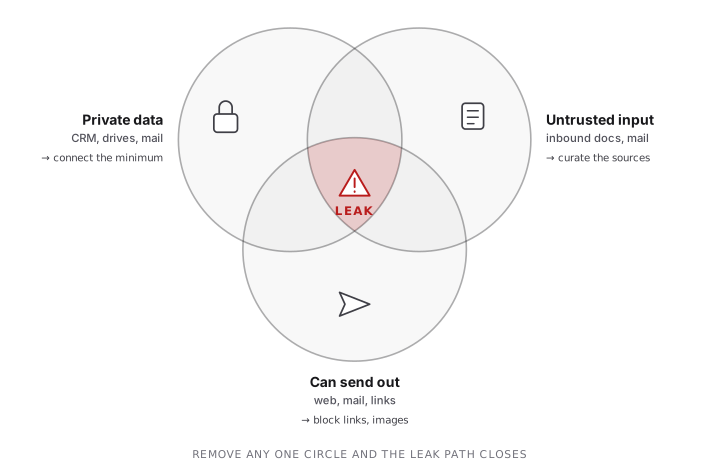
A connected assistant sees everything the connected account sees, and it can be manipulated. Security researchers spent 2025 proving the point: EchoLeak showed a single crafted email could make Microsoft 365 Copilot leak internal files; AgentFlayer did it to ChatGPT via a poisoned document in Google Drive; ShadowLeak abused ChatGPT Deep Research’s Gmail connector to exfiltrate inbox data from the cloud side, invisible to your own defenses. All were patched, but the pattern (an assistant that reads untrusted content and holds private data and can communicate out, what researcher Simon Willison calls the “lethal trifecta”) is structural. The practical rules: connect the minimum, prefer read-only and block outbound links and images in answers (EchoLeak and AgentFlayer both carried data out through a rendered link or image), and let an admin, not each employee, decide which sources get plugged in.
Letting an admin decide is also becoming a product feature. Enterprise-managed authorization, a stable extension of the MCP standard, lets an admin approve connectors once in the company identity provider, so employees find them already approved when they sign in, limited to the groups and roles they hold anyway, with no consent screen per person. Claude offers it on its Team and Enterprise plans, but each connector’s vendor and your identity provider have to support it too, and that support still varies, so check before relying on it. Knowing which AI tools reach which data is also the groundwork for complying with the EU AI Act.
Be clear about what it fixes, though: it settles who gets which connector, the governance half of the question. It breaks none of the three rings above. An approved connector reading a poisoned document is still an approved connector reading a poisoned document.
Where does your data go?
On the business tiers of both vendors, your data is not used to train models. That part is settled. Residency is not, and the two differ in a way worth knowing. Anthropic’s own service stores data in the US and processes it in the US or globally. Companies that need EU processing usually go through a cloud provider’s EU region, and should check which Claude models are available there. OpenAI goes further and stores customer content at rest in-region, Europe included, though only on ChatGPT Enterprise and Edu and only through a sales process. So if your requirement is European storage inside the assistant itself, only ChatGPT offers it today, and only on its top tier.
Consumer plans are a different story. OpenAI trains on consumer ChatGPT conversations by default unless the user switches it off, and Claude asks each user to choose whether their chats may be used for training. Either way, the decision sits with the employee, not with you. That makes employees pasting company data into personal accounts a real policy problem, not a theoretical one. If your team is going to use AI with internal data, give them a sanctioned, governed way to do it, which is what moving from shadow AI to one company platform comes down to.
What does it cost for your team?
Assistant subscriptions are priced per seat: roughly $20–25 per user per month for a standard seat on Claude Team or ChatGPT Business, depending on annual or monthly billing. For a 20-person company that is $4,800–6,000 a year before anyone has built the custom connector to your ERP, and the employees who use it daily subsidize the ones who open it twice a month.
Connectors, or your own internal assistant?
For many teams, off-the-shelf connectors are genuinely enough: if your knowledge lives in Google Drive or SharePoint and your governance needs are simple, a Business/Team subscription with two or three connectors is a fine answer.
A dedicated internal chatbot becomes the better answer when the three questions above start to bite. It runs in a dedicated environment, or entirely on your own premises, with your data under your control. It answers only from a knowledge base you curate, with guardrails, instead of from whatever a connected account can reach. It connects to your real systems (wikis, CRM, ERP, databases) through integrations we build for you. And it is priced as a flat monthly tier sized to the team rather than per seat, whether your people ask three questions or three hundred. That is what Oskar runs today, and why a governed company assistant often costs less than a pile of individual licences.
| Off-the-shelf connectors | Dedicated internal chatbot | |
|---|---|---|
| Best when | Knowledge lives in Drive or SharePoint | Knowledge is scattered across systems |
| Time to first answer | An afternoon | 2 to 4 weeks |
| What the AI can reach | Whatever the connected account sees | A knowledge base you curate |
| Connects to ERP or industry software | Custom connector, built by you | Built for you |
| Hosting | Vendor cloud; EU storage only on ChatGPT Enterprise and Edu | Dedicated environment or on-premise |
| Pricing | Per seat, at every headcount | Flat tier sized to the team |
| Governance | Central via your identity provider, on business tiers only | One governed door |
See the Internal Chatbot package →
What we build for you
- Custom MCP connectors for your ERP, industry software or internal database, usable from both Claude and ChatGPT. Each server exposes one domain of your data rather than a whole account. For Oskar Architecten we built MCP servers that let the assistant search project databases, building regulations and material specifications, each scoped to one domain. See our custom projects.
- A dedicated internal assistant when connectors are not enough: the Internal Chatbot package, usually live within two to four weeks on your own documents.
- Technology we run ourselves: our AI helpdesk TicketFlow exposes its own MCP server, so a support team can search tickets, change their status and prepare draft replies from MCP clients such as Claude.
Tell us which system you need Claude or ChatGPT to reach, and we will tell you whether a connector, the Internal Chatbot package or a custom MCP server fits.
Facts, plans and prices in this post were checked in September 2026 and move fast. Verify current details with each vendor.